

Proto Review: Making Live Prototypes Reviewable
How I turned live webpages and coded prototypes into a visual review surface, with screenshot-backed pins, local-first storage, and user-controlled exports to FigJam or PDF.
The problem I could not unsee
Coded prototypes have become the place where product behaviour is most honestly revealed. They load data, respond to clicks, break at awkward widths, and carry the small interaction details that static frames cannot. Yet the feedback loop is still usually built for static design files.
That creates a familiar translation tax: take screenshots, paste them into Figma, describe the location again in Slack, or collect a loose list of notes in a document. The reviewer loses the page context; the builder has to reconstruct it; and feedback gets detached from the exact state that prompted it.
I wanted to test a smaller, more direct model: make the live prototype itself the review surface.
The hypothesis
If a reviewer can leave a note precisely where they see an issue, keep every note connected to a visual record, and export the result into an existing team ritual, then reviewing a live prototype should feel less like documentation work and more like a natural part of product critique.
The important constraint was just as much about what not to build. This was not meant to be another feedback platform with accounts, cloud workspaces, and a new place for teams to check. It had to work on the URLs teams already use, preserve privacy by default, and hand the result to the tools they already have.
What I built
A review begins from the Chrome toolbar. Enter comment mode, click a point on the live page, and Proto Review captures the visible screen and opens a structured note. Each comment is numbered, pinned to its page location, and classified as a bug, question, suggestion, or praise.
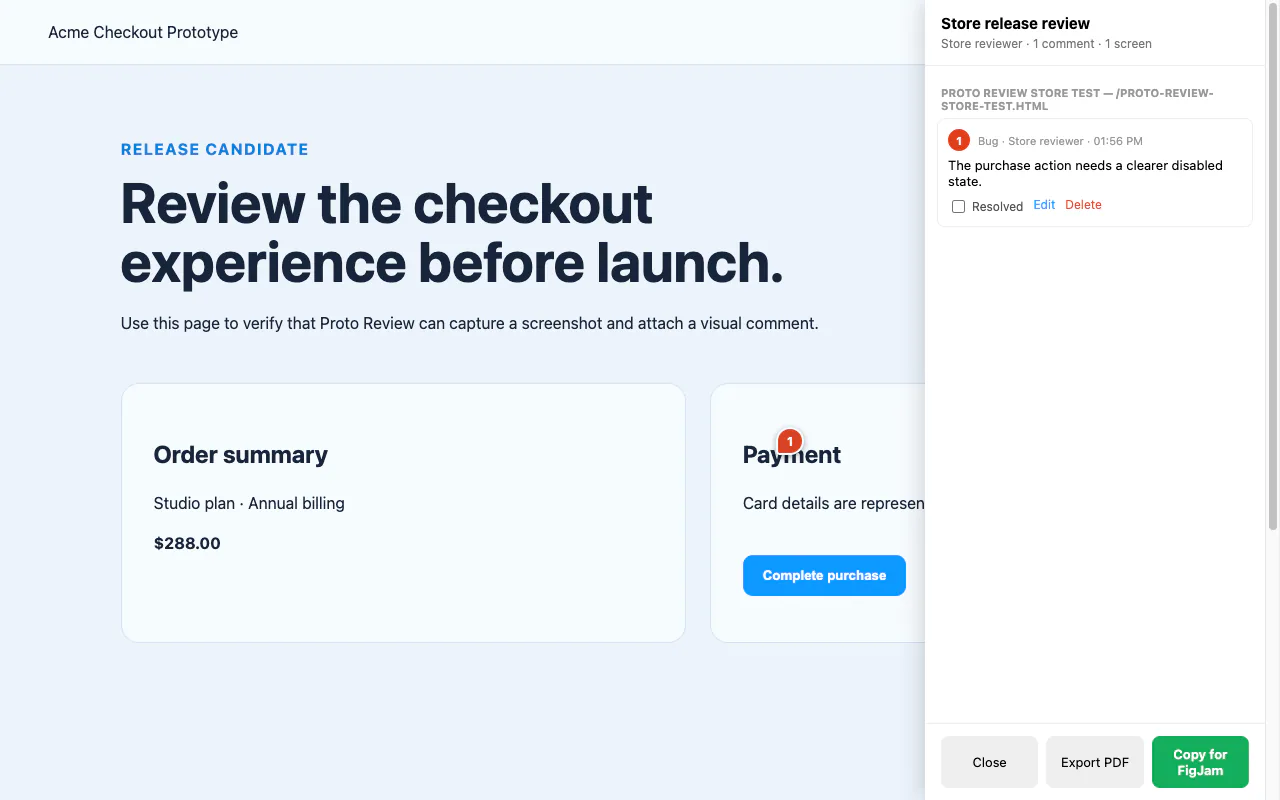
The review sidebar gives that captured context a working home: comments are grouped by screen, remain available while a reviewer moves through a prototype flow, and can be edited, resolved, or deleted as the discussion progresses. Keyboard shortcuts make the two frequent actions quick: comment mode and the sidebar.
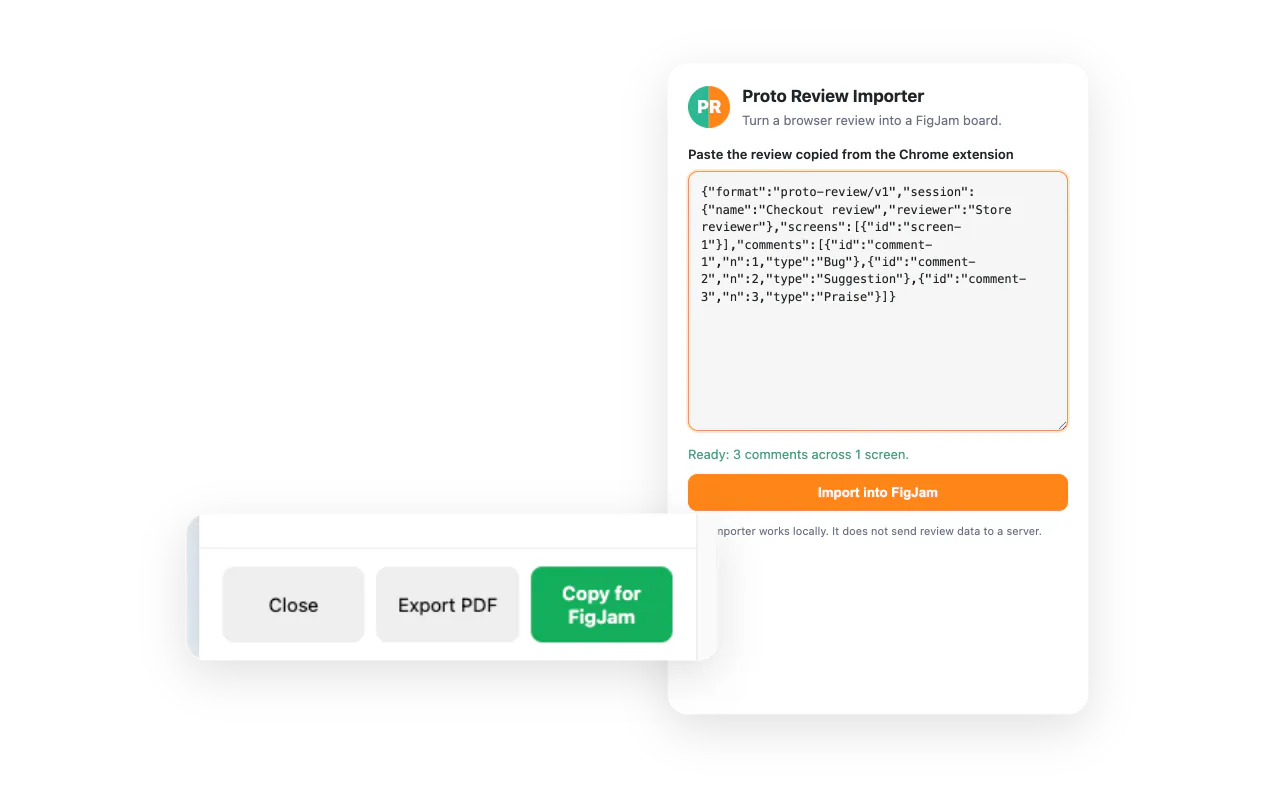
When the review is ready to leave the browser, it can become a self-contained PDF deck or a structured clipboard payload for the companion FigJam importer. That handoff deliberately avoids a server or live-sync connection: copy the review, paste it into the importer, and create a visual board with screenshots, numbered pins, connectors, and comment cards.
How it was built
Chrome extension: an annotation layer for any chosen tab
The core product is a dependency-free Chrome Manifest V3 extension. A popup starts and names a review; the content script mounts the in-page annotation interface; and the extension captures the visible tab only after the reviewer explicitly enters comment mode and clicks a location.
The permission model was a product decision, not a compliance afterthought. Proto Review uses activeTab rather than broad host access, so it receives temporary access only to the tab the person intentionally opens for review. Screenshots, page metadata, pins, comments, and session state stay in Chrome’s local extension storage. No review content is sent to a server.
Keeping visual feedback useful after the first comment
The implementation stores the page URL, viewport, scroll position, coordinates, timestamp, comment type, and a screenshot of the visible state. That means a note has enough context to be understood later, not just a sentence that says “this looks wrong.”
I also treated the extension lifecycle as part of the interaction design. Reloading an unpacked extension can leave old tabs without the current content script, so the shipped flow includes reinjection handling, in-page shortcut support, duplicate-event suppression, and clear session teardown. A review tool earns trust by surviving the slightly messy way people actually use browsers.
FigJam: an intentional export boundary
The FigJam importer is a separate development plugin, not an embedded integration. It consumes the proto-review/v1 payload and creates a board made of screenshots, numbered pins, connector lines, and comment cards.
That separation keeps the architecture honest. The extension does not claim to publish into someone’s Figma account or maintain a background sync. The reviewer explicitly exports; the team explicitly imports. For an early product, that was a better trade than asking teams to trust another account, service, and permissions layer.
Website: shipping the product story without a framework tax
The companion marketing site is a static HTML, CSS, and JavaScript build. It was designed to work when opened directly from the local filesystem as well as from a normal web server, so the animation layer uses a local UMD build of Anime.js rather than a dynamic module import that fails in Chrome’s file security model. Product artwork and screenshots are local project assets, and the site leads with the same promise as the extension: review the prototype, not a picture of it.
Design choices that shaped the experiment
- Choice
Screenshot-backed pins
Why it matteredA comment needs the state that caused it, not only a coordinate or a written description. - Choice
Local-first storage
Why it matteredReviewing sensitive prototypes should not require sending the work to a new service. - Choice
PDF and FigJam export
Why it matteredThe output fits both a durable review artifact and a collaborative whiteboard workflow. - Choice
Manual FigJam handoff
Why it matteredIt keeps the boundary explicit and avoids pretending an early product has live collaboration infrastructure. - Choice
Four comment types
Why it matteredFeedback becomes easier to scan and act on when bugs, questions, suggestions, and praise have a consistent visual language.
What this experiment taught me
The most useful insight was that visual feedback does not need more ceremony; it needs less translation. Putting the annotation tool on top of the prototype lets the critique stay attached to the actual behaviour and state that inspired it.
It also reinforced that privacy and workflow fit are product features. A local-first model removes the account-creation hurdle and makes the rule simple: nothing leaves the browser unless the reviewer asks it to. The FigJam importer then meets teams where collaborative synthesis is already happening, without turning the first release into a platform project.
The next questions are behavioural, not technical: which review moments most benefit from pins versus written synthesis, how teams use the four feedback types over time, and whether the export artifacts reduce the follow-up clarification that normally comes after a critique.